How much eSIM data do I need? Estimate your eSIM data allowance from your own recent mobile usage, then adjust for the length and shape of your trip. Divide data used by the days measured, multiply by travel days, and add any extra use you expect. A generic allowance for every traveler is less useful than a baseline you can check.
Device guidance checked: 22 October 2026.
Start with your actual mobile data history
Use a recent period that resembles your travel routine. If your normal week is mostly spent on home or office Wi-Fi, that history may underestimate days spent sightseeing. A previous trip or several days away from your usual Wi-Fi can provide a closer comparison.
On iPhone, open Settings > Cellular or Mobile Data and review the app totals. Apple's cellular-data guide explains the usage statistics and Reset Statistics option. Establish what dates the counter represents before treating it as a monthly total. Save the existing reading before resetting it for a new observation period. With Dual SIM, check which data line you are measuring.
On Pixel, go to Settings > Network & internet > SIMs > App data usage and select the period you want to review. Google's data-usage instructions also explain warnings and limits. Other Android manufacturers may use different menus.
Record three things: the amount used, the dates covered, and whether you were mainly on Wi-Fi. Your carrier's account history can help confirm the measurement period.
Turn your history into a trip estimate
Use this calculation:
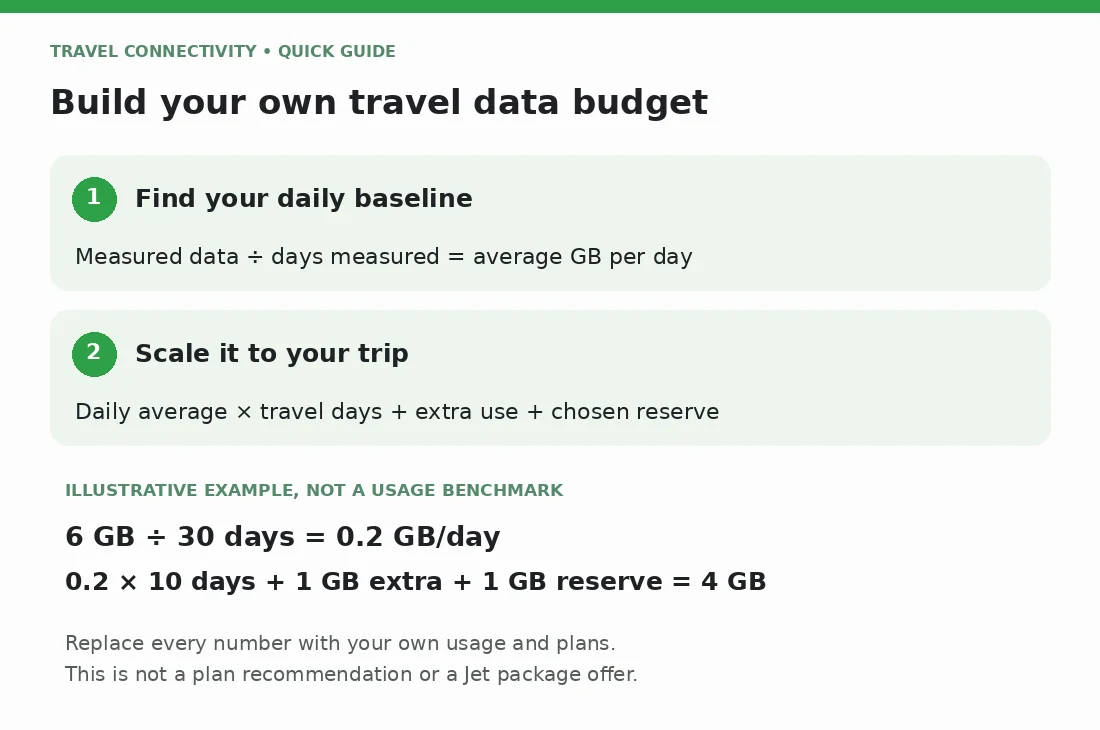
Estimated trip data = measured daily average × travel days + planned extra use + a chosen reserve.
Here is illustrative arithmetic, not a measured usage benchmark:
- Suppose your phone used 6 GB across 30 representative days.
- Your measured average would be 6 ÷ 30 = 0.2 GB per day.
- For a 10-day trip, the same pattern would use about 2 GB.
- If you expect an additional 1 GB of uploads and choose a 1 GB reserve, the working budget becomes 4 GB.
The additional allowance and reserve are assumptions for this example. Replace every number with your own evidence and plans. A 4 GB budget is not a recommendation for all 10-day trips or a claim that Jet sells that exact package.
Count arrival and departure days when you will need mobile internet. Avoid subtracting a day simply because part of it is spent flying.
What should you change for this trip?
Review the apps responsible for your largest totals rather than labeling yourself a light or heavy user. Then ask what will change:
- Will hotel Wi-Fi replace some evening use, or will you work away from the hotel?
- Will you upload more photos and videos than usual?
- Will you stream entertainment rather than download it beforehand?
- Will you share the connection with a laptop or another person?
- Will you need video meetings or large work files while traveling?
For an unfamiliar activity, observe your own usage during a representative session before departure. Note the counter before and after, keep track of other traffic, and treat the difference as a rough personal estimate. Do not mistake one session for a reliable per-hour rate for an app.
Hotspot use needs separate attention. A phone-only baseline may omit the laptop downloads, backups, and updates that you will later send through the same connection. Include those devices in the budget and verify that the chosen package permits tethering.
Is 5 GB or 10 GB enough?
Either allowance can be enough when it exceeds your adjusted estimate and remains valid for the entire trip. Neither is a useful universal answer without knowing your usage.
If your calculation is comfortably below 5 GB, compare available packages around that requirement. If it approaches the allowance, consider more capacity or a verified way to add data. Do not rely on a top-up being available unless the package details confirm it.
Choose your reserve according to the consequences of running out. Someone who can wait for hotel Wi-Fi has different needs from someone relying on a connection for work outside the hotel. There is no single reserve percentage that fits both.
Once you have a target, Jet's international data-plan guide covers the broader selection questions. This estimate handles the data quantity, not every part of choosing a plan.
Reduce avoidable use without losing essential functions
Download entertainment and large files on a suitable Wi-Fi connection before leaving. Review automatic photo uploads, app updates, and video settings so they match your intended budget.
On iPhone, Low Data Mode reduces background activity and changes behavior such as automatic downloads and streaming quality. It can also pause photo updates and backups, so check whether delayed syncing fits your needs.
Google Maps supports offline areas, subject to regional availability. Offline Maps does not provide every online feature: walking, cycling, and transit directions are unavailable offline, and driving lacks live traffic. Prepare downloads, but keep data available for the features you actually need.
Check the estimate against real usage during the trip
After the first full travel day, compare usage with your planned daily average. If consumption is higher, inspect the largest app totals before buying more data. A one-time upload and an everyday habit need different responses.
Check the provider's remaining allowance as well as the phone counter. Google notes that device and carrier measurements can differ. A device warning is a useful prompt to review usage; it does not change the plan's allowance. A configured hard limit can switch mobile data off, so understand the consequence before using one.
Before choosing from Jet's international eSIM options, confirm destination coverage, validity, and what starts the validity period. Use the activation-timing guide to plan setup separately from your data budget.
Frequently asked questions
How much eSIM data do I need for one week?
Multiply your representative daily usage by seven, then adjust for different activities and a reserve. Trip length alone cannot determine the allowance.
Does connecting to Wi-Fi guarantee no mobile data use?
No. Check the phone's connection settings and counters. Apple notes that automatic cellular fallback can use mobile data when Wi-Fi is poor; review the relevant setting if you are budgeting closely.
Should I buy the largest allowance available?
Only if your expected use supports it. Estimate first, then compare suitable packages and any verified extension or top-up options instead of paying for capacity you are unlikely to use.