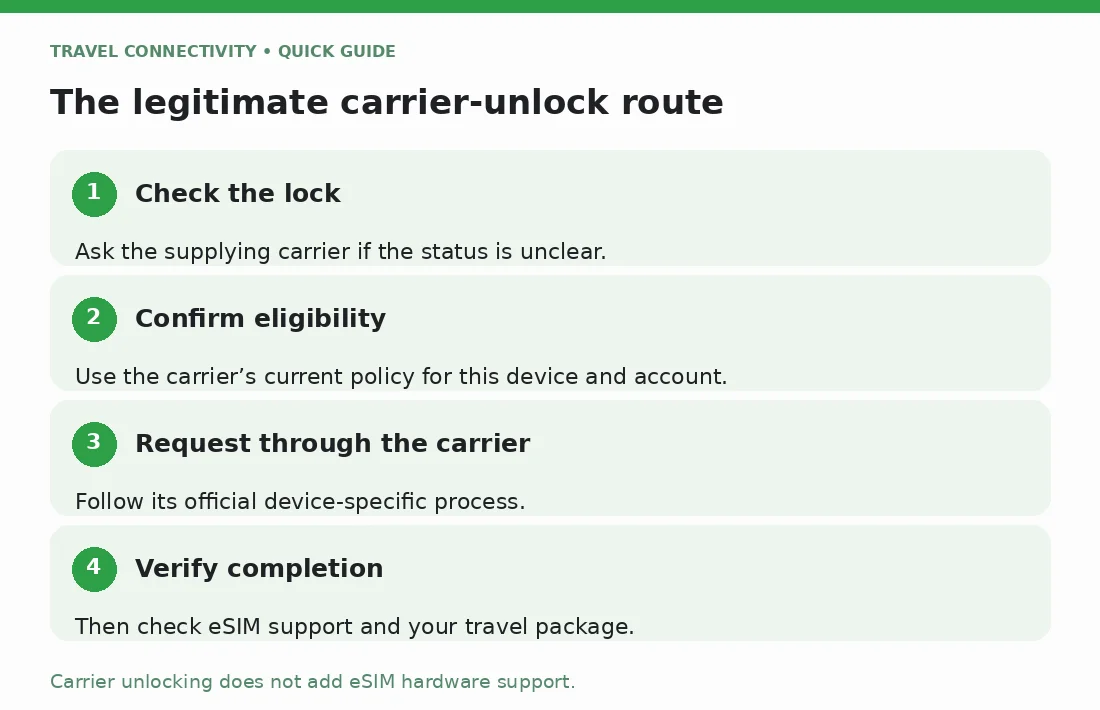
To unlock your phone for an eSIM from another provider, check whether it is carrier-locked, ask the carrier that controls the lock to confirm eligibility, and complete its official unlock process. Wait for confirmation before buying the travel plan. Unlocking removes a carrier restriction; it does not add eSIM support to a phone that lacks it.
This guide covers a legitimate carrier unlock for a phone you own or are authorized to manage. It does not cover forgotten screen passcodes, account recovery, or bypassing device security.
Unlock Phone for eSIM: Do You Need a Carrier Unlock?
A carrier lock can prevent a phone from accepting another provider's mobile service, whether that service uses a physical SIM or eSIM. Having an Add eSIM button does not establish that the phone is unlocked.
You may not need an unlock to use an eSIM supplied by the same carrier. However, a travel eSIM from a different provider is a separate question. Check the lock before choosing a package, even if your existing home eSIM works normally.
If the phone is already unlocked, skip the request process. Confirm the exact model's eSIM support and the travel provider's device requirements instead.
How do you check whether the phone is locked?
On iPhone
Open Settings > General > About and find Carrier Lock. If it says “No SIM restrictions,” the iPhone is unlocked. Apple's official unlock instructions confirm that only the carrier can remove a carrier lock; Apple cannot do it.
If the status is unclear, ask the carrier to check the specific device. The fact that you can open the phone with Face ID, a fingerprint, or a passcode tells you nothing about its carrier-lock status.
On Pixel or Samsung Galaxy
Use the supplying carrier's official support channel to confirm the device's lock status. Do not assume every Android model has an iPhone-style Carrier Lock field.
Google's Pixel carrier guidance distinguishes SIM-locked from SIM-unlocked devices and directs owners to their mobile provider to discuss removing a lock. Samsung's network-lock guidance likewise directs users to the original carrier or retailer and the carrier's instructions.
Describe the actual error if you have one. A network unlock request is different from a SIM PIN request, so avoid guessing codes.
What should you check before requesting an unlock?
Find the carrier's current official device-unlock policy for your account and phone. Eligibility can depend on the purchase and service arrangement; a friend with a different account may have a different process.
Ask the carrier to clarify:
- Whether the phone is eligible now, and which requirement remains if it is not.
- Whether any installment balance or account-standing condition applies.
- Whether a minimum ownership or service period applies to this device.
- Whether the carrier needs the original account holder to submit the request.
- How to check progress and what confirms completion.
Samsung's guidance specifically highlights account standing and device payment status as checks. Treat those as questions for your carrier, not a universal rule that paying off a phone automatically unlocks it. Do not make financial changes merely because an unofficial page promises immediate unlocking.
How do you submit a legitimate unlock request?
Start with the carrier's official website, app, store, or customer support. If you reach a support page through a search result, verify the domain before entering account or device information.
- Identify the phone. Have the model number and the device identifier requested by the carrier ready. If there are multiple IMEIs, ask which one it needs.
- Confirm your authority. The carrier may need the account holder or an authorized administrator to complete its checks.
- Explain the request clearly. Say that you want a carrier unlock so the device can accept another provider's eSIM while traveling.
- Follow the carrier's device-specific instructions. Not every phone uses an unlock code, and instructions for another model may not apply.
- Save the case reference and completion message. Use these if the status does not update or the carrier needs to investigate.
Share identifiers only through the official support process. Do not publish your IMEI, installation QR code, or account details in a public comment asking for help.
What if the phone is secondhand or belongs to work?
For a secondhand phone, establish which carrier originally supplied it. Your current SIM provider may not control the lock. Ask the seller for the original carrier information and any purchase evidence you need, without requesting access to their account.
If support says the original account holder must act, return to the seller rather than looking for a bypass. If a phone sold as unlocked remains locked, keep the listing and receipt while discussing the mismatch with the seller.
For an employer-owned phone, ask the administrator before changing mobile service. Company ownership and account permissions can affect who is allowed to request the unlock.
How do you confirm the unlock worked?
Wait for the carrier's completion notice and follow any final instructions it gives. Recheck Carrier Lock on iPhone. On Android, use the carrier's specified verification method rather than assuming a restart proves success.
Then confirm eSIM compatibility with the intended travel provider. Once that is settled, use Jet's iPhone eSIM installation guide or Samsung eSIM installation guide for setup.
If an unlocked, supported phone still fails to connect, the problem may require a different investigation. Record the error and use Jet's eSIM troubleshooting guide instead of submitting repeated unlock requests.
What if departure is close and the request is pending?
Ask the carrier for the status of your specific case. There is no completion time that applies to every carrier and device. Arrange connectivity that does not depend on an unfinished unlock, and do not buy an incompatible plan as a test.
Once the unlock is confirmed, check the package's validity rules before installation. Jet's activation-timing guide explains the distinction between preparing an eSIM and starting its usable period.
Frequently asked questions
Does converting my physical SIM to eSIM unlock the phone?
No. Changing the SIM format is separate from removing the carrier restriction. Ask the carrier to confirm unlock status specifically.
Can Jet unlock my phone for me?
Use the carrier that controls the lock. Buying a travel eSIM does not complete the carrier's unlock process.
Should I delete my current eSIM to unlock the phone?
Do not delete it as an experiment. Apple warns against erasing an eSIM for troubleshooting unless the carrier directs you to do so; you may need its help to obtain a replacement.